


Terramar Brands USA
4.720.00 Reviews
App Specs
- Version
- 2.3.0
- Updated On
- License
- Free
- Downloads
- 10,000+
- Developer
- TerramarBrands
- Categories
- Beauty
- Platform
- Android
Screenshots


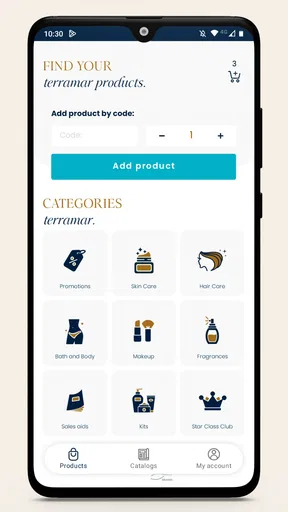
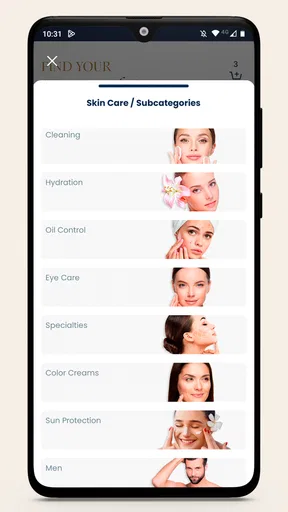
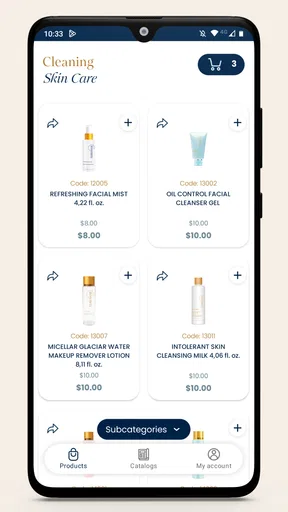

 Analysis by AppCompare
When a beauty shopping app makes it easy to browse, the next question is whether it helps you make a sensible choice or simply adds another place to shop. I find Terramar Brands USA most useful when I already have a reason to look for Terramar Brands products and want to keep that search, my cart and my product decisions together. It is less compelling as a general beauty guide for someone who wants to compare a wide range of unrelated brands.
Where shopping apps can get confusing
The first point to check is what you expect from the app. Its clearest purpose is shopping: it is a free beauty app from TerramarBrands, with a shopping cart. That makes it a natural option for someone interested in the brand, but not automatically a replacement for a broad retailer where products from many companies sit side by side.
This distinction matters before you spend time setting up or browsing. If you came hoping to build a routine from scratch, compare many brands, or get neutral recommendations across the beauty market, a brand-focused shop may feel narrow. If you already know you want to explore Terramar Brands, a dedicated app can make that particular errand more direct.
I would also separate the basic shopping job from claims about extra tools. The app’s purpose is clear enough to assess as a place to browse and use a cart, while a buyer should judge any product by its own description and suitability rather than assuming an app can resolve every skincare question. For sensitive skin or a concern that needs professional advice, a product catalogue is not a substitute for a clinician.
Setup checks that save time
Before starting a purchase, I would check the simple things that commonly interrupt mobile shopping: that the app is installed on a compatible device, that the connection is working, and that the item details are still visible when I return to the cart. The current version is 2.2.11 and the minimum Android requirement is 5.0, useful checks if the app will not install or launch on an older phone.
If a page seems slow or does not refresh, I would first distinguish a connection problem from an account or checkout issue. Try loading another page, switch between Wi-Fi and mobile data if available, and reopen the app before repeating an action. This is ordinary troubleshooting, not a guarantee that every delay has the same cause.
For a smoother visit, I would decide what I am looking for before opening the catalogue: a particular product, a type of item, or simply a chance to browse. Keeping that goal in mind makes it easier to avoid filling a cart with things that caught my eye but do not fit my routine. It is a small habit, but especially useful when browsing beauty products can turn into an unplanned shopping session.
Worth Reading Before You Choose

EA SPORTS FC Mobile 26 Is a Bigger Football Game, but It Takes Time

Flipboard Shows What News Apps Must Do Beyond the Feed

Switching to Android Auto Means Rethinking Your Driving Routine

Google Calendar Makes a Crowded Week Easier to Manage

Ludo King Makes the Most of the Minutes Between Plans

Baby Panda World Brings Quick Play to Modern Phones, but Its Game Library Feels Busy
A calmer way to browse and recover a purchase
My practical approach is to treat the cart as a decision point, not just a finish line. Add items only after checking their descriptions, then pause before checkout to make sure each one still fits the reason I opened the app. If you are comparing options, jot down the product names and the specific question you need answered; that is more reliable than relying on memory after moving between screens.
If the app closes or a shopping step fails, I would reopen it and check whether the item is still in the cart before trying again. Repeating a checkout action without checking can create confusion about what has or has not gone through. If the cart looks different, return to the relevant product page and verify the selection rather than assuming an earlier tap was saved.
For a planned purchase, it can help to browse when you have a few uninterrupted minutes. Beauty shopping often involves reading descriptions and considering whether a product suits your needs; rushing through that choice makes the cart convenient but the decision less thoughtful. I would use a quiet moment to review the items, and leave anything uncertain out until I have enough information to feel comfortable.
When a different option is better
Compared with a general beauty retailer, a brand-specific shopping app has a clear trade-off: it keeps attention on one company’s range, while a multi-brand store is usually better for comparing alternatives across labels in one place. Neither approach is automatically better. The right choice depends on whether you are looking for Terramar Brands or still deciding which brand and product category suit you.
Likewise, if your main need is independent ingredient research, a dedicated reference source may be more useful than a shopping app. I would use the app to explore and shop, then consult trustworthy skincare guidance when I need help understanding an ingredient or managing a skin condition. That division keeps shopping convenient without treating product browsing as medical advice.
The app is also a weaker fit for anyone who does not want to shop from a single brand or who expects a beauty app to provide a complete routine-planning service. In that case, a broader retailer or a specialist skincare resource may better match the task. It is worth choosing the tool for the job rather than installing it because the word “beauty” sounds broad.
Who will get the most from it?
I would recommend trying it if you already shop with Terramar Brands, want a dedicated place to explore its products, or prefer keeping a brand-specific purchase in a mobile cart. It may also suit someone who wants a simple route from browsing to considering a purchase, without needing a general marketplace as the starting point.
A realistic use case is someone checking their usual beauty shopping during a lunch break. They open the app, look for a product they already have in mind, read its details, and add it to the cart only if it fits the need. If they are unsure, they can leave the decision for later instead of buying impulsively. That workflow makes the app useful as a practical shopping companion rather than a reason to shop more often.
With an average rating of 4.7 from 56 ratings, it has a positive reception among the people who have rated it; that is a helpful signal, not a promise that every user will have the same experience. It has 10K+ installs, is rated for Everyone, and is free to download. Those details make trying it a low-commitment choice, though the value still depends on whether its brand-focused purpose matches what you need.
What to check before relying on it
People often want to know whether they need to pay to download a shopping app, whether it suits their phone, and whether it is aimed at a particular age group. Here, the app is free, Android support starts at version 5.0, and its content rating is Everyone. The app was released on Sep 28, 2022, and its current version is 2.2.11. I would check compatibility before installing, especially on an older device.
Another sensible question is whether it is useful without an immediate purchase. I would treat browsing as a way to explore the brand’s offerings and decide what merits further consideration, rather than expecting every visit to end in checkout. For a shopper who prefers to research first, that separation is valuable: looking is not a commitment to buy.
If you run into trouble, start with the step that failed. If the app will not open, check compatibility and connection before retrying. If browsing works but the cart does not reflect your choice, revisit the product and confirm the selection. If checkout is the problem, avoid repeatedly submitting the same action; check the current state first, then seek help through an appropriate support route if the issue continues.
My experience with Terramar Brands USA
Once you fire up the Terramar Brands USA app, you’re greeted with a sleek and intuitive interface. It’s like walking into a high-end spa, minus the cucumber water. Setting up an account is a breeze. You’ll be prompted to enter some basic info, and in no time, you’re ready to explore what this app has to offer.
Exploring the Features
If you’re anything like me, you probably love discovering new products and figuring out what works best for your skin. The app offers a comprehensive catalog of products, each detailed with descriptions and user reviews. It's like having a personal beauty consultant right in your pocket.
One feature I particularly love is the personalized recommendations. By answering a few questions about your skin type and preferences, the app suggests products tailored just for you. It’s like having a friend who knows exactly what you need for that flawless glow.
Shopping Made Easy
The shopping experience is seamless. You can easily add items to your cart, check out with a few taps, and even save products for later. The app keeps you updated on the latest deals and discounts, so you’ll never miss out on a great offer. Trust me, your wallet will thank you!
Keeping You Informed
In addition to shopping, the app offers a wealth of information about skincare. From tips and tricks to detailed articles about ingredients, it’s a treasure trove of knowledge. I found myself diving into articles and learning more about how to take care of my skin properly.
User-Friendly Experience
Navigation is a breeze. The app’s design is clean and organized, making it easy to find what you’re looking for. Whether you’re browsing products or reading up on the latest trends, everything is just a tap away.
Community Interaction
What’s cool is that you’re not alone in your skincare journey. The app features a community section where you can interact with other users, share tips, and get advice. It’s like being part of a big skincare family.
Why You Should Try It
If you’re still on the fence about downloading the app, let me give you a little nudge. With its extensive range of products, personalized recommendations, and educational content, Terramar Brands USA is a must-have for anyone serious about skincare. Plus, the community aspect adds a layer of interaction that’s both fun and informative.
So, are you ready to give your skincare routine a little upgrade? Download the app, explore its features, and join a community that’s passionate about taking care of their skin. Who knows, you might just discover your next holy-grail product!
My practical verdict
For me, the strongest reason to use this app is straightforward: it gives Terramar Brands shoppers a dedicated mobile place to explore and manage their shopping. I would not choose it as my only source for neutral skincare advice or as a substitute for comparing products across many brands, but that does not make it a poor fit for its intended audience.
The useful habit is to browse with a purpose, read carefully, and treat the cart as a place to review choices before completing a purchase. If you want a focused route into Terramar Brands’ beauty offerings, I think it is worth a try. If you want broad brand comparisons or specialist guidance first, start elsewhere and return to the app only when its narrower focus is what you want.
Pros
- User-friendly interface for easy navigation.
- Wide range of beauty and wellness products.
- Regular updates with new product launches.
- Secure payment methods ensure safe transactions.
- Exclusive discounts and promotions for users.
Cons
- Limited customer support options available.
- Occasional bugs during checkout process.
- Requires stable internet for smooth browsing.
- Some products may have limited stock.
- No offline access to product catalog.
FAQs for Terramar Brands USA
What is Terramar Brands USA, and what does the app offer?
Terramar Brands USA is an app dedicated to providing users with a comprehensive selection of high-quality skincare and beauty products. The app offers an intuitive interface to browse products, read detailed descriptions, and access user reviews. Additionally, it provides special promotions and easy purchase options. Ideal for beauty enthusiasts, the app ensures a seamless shopping experience.
Is the Terramar Brands USA app available for both Android and iOS devices?
Yes, the Terramar Brands USA app is available for download on both Android and iOS platforms. Users can easily find the app on the Google Play Store for Android devices and the Apple App Store for iOS devices, ensuring accessibility for a wide range of users who want to explore their skincare and beauty offerings.
Are there any costs associated with using the Terramar Brands USA app?
Downloading and using the Terramar Brands USA app is free of charge. However, purchases made through the app for skincare and beauty products will incur costs. The app may feature special deals and discounts, so users are encouraged to explore these opportunities to save on their purchases.
How reliable are the product reviews on the Terramar Brands USA app?
The Terramar Brands USA app features reviews from real users who have purchased and used the products. These reviews are intended to provide genuine feedback on product effectiveness and user satisfaction. While the app aims to maintain the integrity of reviews, users should consider multiple perspectives before making a purchase decision.
What should users do if they encounter issues with the app?
If users experience any issues with the Terramar Brands USA app, they should first check for updates that might resolve the problem. For persistent issues, the app provides a customer support feature within its menu. Users can contact support for assistance with technical problems, product inquiries, or feedback on their app experience.


